Salon answering service booking: what must be true before a slot is confirmed
A salon answering service should confirm a slot only when the actual booking connection supports the chosen provider, service duration and required buffers, and the appointment has saved successfully in the salon’s authoritative schedule. A fluent conversation or an empty-looking calendar is not enough. Use the readiness table below to decide which requests can become bookings and which need the salon’s confirmation.
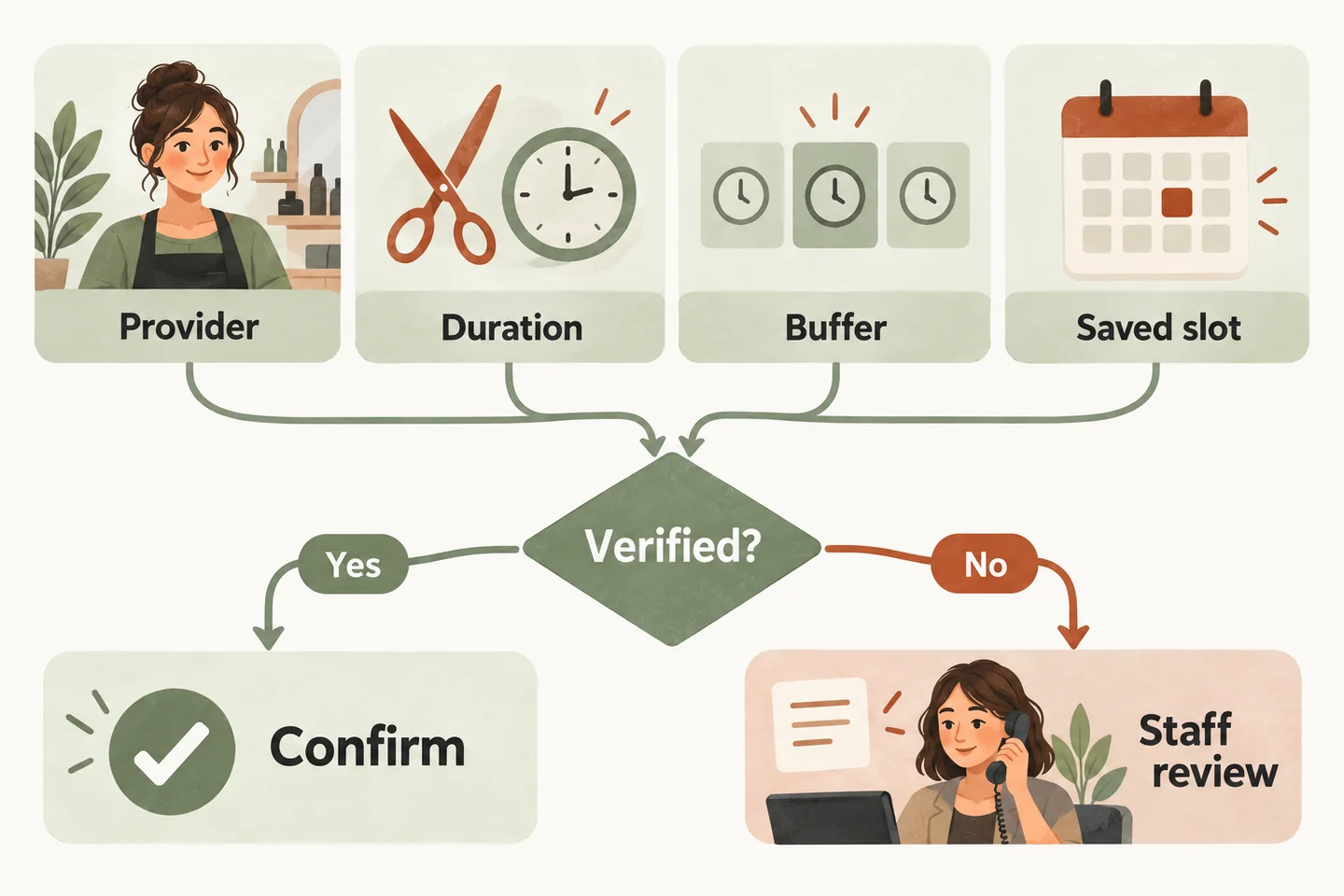
Name the schedule that actually controls availability
Ask the owner to name the calendar or salon system staff use to decide whether a client can attend. Then identify where the answering service reads availability and writes appointments. If those are different places, document the supported connection and demonstrate how a new booking reaches the schedule staff trust.
Do not treat a manually copied diary as a verified integration. A copy may look current during a demonstration without showing what happens when a stylist adds a booking elsewhere. Test a change in the authoritative schedule and inspect what the receptionist can subsequently offer. Record any delay or unresolved mismatch.
Our AI receptionist for small business offer covers one business, one location, one receptionist and one supported calendar. Google Calendar booking requires an enabled, connected workflow. A salon using another booking system needs its actual compatibility verified; collecting a request remains a possible starting scope.
The broader guide to an AI receptionist for salons covers service intake and stylist judgment. This checklist concentrates on the evidence needed before the receptionist says a time is booked.
Complete a readiness table for each bookable service
Copy this original table into your setup notes. Add the approved rule, test date and reviewer beside each row. “Unknown” means the requirement remains open; it is not a pass. Repeat the review when a provider, menu item or scheduling rule changes.
| Requirement | Evidence to retain | If unresolved |
|---|---|---|
| Authoritative schedule | Test booking appears in the exact schedule staff use. | Capture a request for staff confirmation. |
| Provider | Requested stylist is eligible and available for this service. | Record preference without promising that stylist. |
| Service length | The approved appointment type reserves the complete required window. | Do not choose a guessed duration. |
| Buffers and closing | Preparation, reset time, breaks and closing rules are respected. | Offer no time that depends on an unverified rule. |
| Successful save | One correct appointment is visible after the action completes. | State that booking is unconfirmed; reconcile first. |
| Manual confirmation | Named staff role receives and resolves pending requests. | Agree on a follow-up route before activation. |
Use the answering-service evaluation checklist to keep these requirements in the written service scope. A price comparison is useful only after both sides agree which appointments the service may confirm.
Test one provider with different time requirements
Start with a limited menu for one provider. As a fictional test, suppose a consultation requires 20 minutes plus a 10-minute reset, while a haircut requires 45 minutes plus a 15-minute reset. These are illustrative inputs, not recommended salon timings or a claim about available software settings.
A 40-minute opening could contain the first 30-minute window but cannot contain the second 60-minute window. Ask for both services against that same opening. Check the recorded start and end times, protected reset period and spoken answer. A system that always reserves one fixed duration has not passed a varied-duration requirement.
Google’s own appointment-scheduling overview describes booking-page duration and buffer features. Those settings do not establish that a connected receptionist uses them. Verify the receptionist’s actual behavior through the approved workflow, including a blocked period and a slot near closing.
If only one appointment type is supported, define that narrow scope explicitly. Route other services to the salon. Do not shorten a service or silently remove a buffer merely to make an offered time appear to fit.
Treat multiple stylists as a separate requirement
Write down whether callers choose a stylist, accept any qualified provider or need staff advice. A shared calendar name alone does not demonstrate provider selection, individual working hours or service eligibility. Nor does access to one stylist’s calendar prove that another stylist’s diary is checked.
Test the case where the preferred stylist is busy while another is free. The receptionist must follow the approved rule for alternatives, rather than treating all availability as interchangeable. Where a service also needs a shared chair or room, record that requirement separately and leave it open until demonstrated.
Do not assume native Fresha, Booksy or Square integration, multiple-stylist scheduling, deposits, SMS reminders or automated cancellations. None is established by this checklist or a website sample. Keep any required but unverified capability outside the initial booking scope.
Give pending requests an honest ending
Keep the caller’s preference, unresolved requirement and follow-up owner together in the handoff. If a save produces an unclear result, staff should check the actual schedule before anyone repeats the action. An uncertain response is not evidence that no appointment exists.
Keep the result that supports your booking promise
For each fictional test, retain the service, provider, full date and time, expected outcome, observed outcome and reviewer. Record whether the event actually saved and whether the required time remained protected. Remove authorized test appointments through the supported process after review.
You can try the live AI receptionist demo with a fictional, nonsensitive salon enquiry. The homepage configuration opens first; press Start when ready. The sample does not create real appointments. Request a personal demo to verify your actual calendar requirements before enabling production booking.
Sources and further reading
YOUR CALLS, YOUR NEXT STEP
Test the booking promise before using it with clients

Try a fictional salon enquiry, then request a personal demonstration of your provider, service duration, buffer and calendar requirements. Keep unverified appointments as requests.