AI appointment scheduling for service businesses: what must be ready
AI appointment scheduling is ready when the business has approved the visit type, the supported calendar connection works, timing rules are verified and the caller receives an accurate outcome. A request for Tuesday morning is only a preference until a suitable appointment is saved. Use this readiness worksheet before letting a phone conversation commit space on your calendar.
Decide which services may be booked directly
An AI receptionist for small business should not treat every enquiry as a bookable job. Start with one clearly defined appointment type: for example, an initial consultation or an approved routine visit. Record what the appointment includes, who can request it and which situations need staff review first.
Separate a visit from its eventual outcome. An assessment appointment does not promise a repair, final quote or completed installation. If job scope changes the duration or requires a specialist, collect a service request until a person confirms the appropriate next step.
Write the approved description and exclusions in your business knowledge base. Give those answers an owner so an outdated promotion or service definition does not become a booking commitment.
Use a readiness worksheet with evidence, not assumptions
This original worksheet is a planning aid. Complete each row for your actual appointment type, then ask the setup team to demonstrate the supported behavior. A written requirement is not evidence that the software currently enforces it.
| Readiness item | Evidence to check | If it is unresolved |
|---|---|---|
| Eligible service | An owner-approved visit description, exclusions and service-area rule. | Collect the enquiry for a person to confirm fit. |
| Calendar connection | The intended Google Calendar is connected and the production booking workflow is enabled. | Use requests until the connection and workflow are verified. |
| Duration and buffer | A test demonstrates the agreed appointment length and any required spacing. | Do not offer visits that depend on unverified timing rules. |
| Availability and timezone | A known available slot and a deliberately blocked period produce the expected choices. | Have staff confirm the time; do not infer availability. |
| Caller and location details | The caller agrees the contact details and the correct visit location or meeting format. | Clarify missing details before treating the appointment as ready. |
| Save and fallback | A successful save can be verified; an unsuccessful action produces a request, not confirmation. | Keep the outcome unconfirmed and assign staff review. |
Keep the evidence simple: the test scenario, expected result, observed result, reviewer and date. Use fictional, nonsensitive details. Where a real connected-calendar test is approved, identify and remove the test event through the supported process afterwards.
Verify the current calendar connection and timing rules
As checked October 16, 2026, our published offer supports booking when the workflow is enabled and Google Calendar is connected. The homepage describes Calendly support as forthcoming. Confirm the connection available for your setup; a calendar provider’s own features do not establish what this receptionist can use.
Set the business requirements for duration, spacing, operating hours and timezone before testing. If travel, equipment or staff skills determine availability, explain that constraint during setup. Do not assume a single connected calendar handles technician selection, multiple locations or every field-service integration.
Test near opening and closing time, and around a known blocked period. A slot that looks empty is not enough if the visit would overrun the business’s approved hours.
Read back the details before calling it confirmed
Before attempting the booking, confirm the agreed service, date, start time, timezone and location or meeting format aloud. Verify the caller’s name and callback details rather than relying on a rushed introduction. For a service visit, distinguish the service address from another address the caller may mention.
Use a full date when “next Friday” could be misunderstood. If the caller changes the time or location, resolve that change before proceeding. The readback checks shared understanding; it does not itself mean an event has been saved.
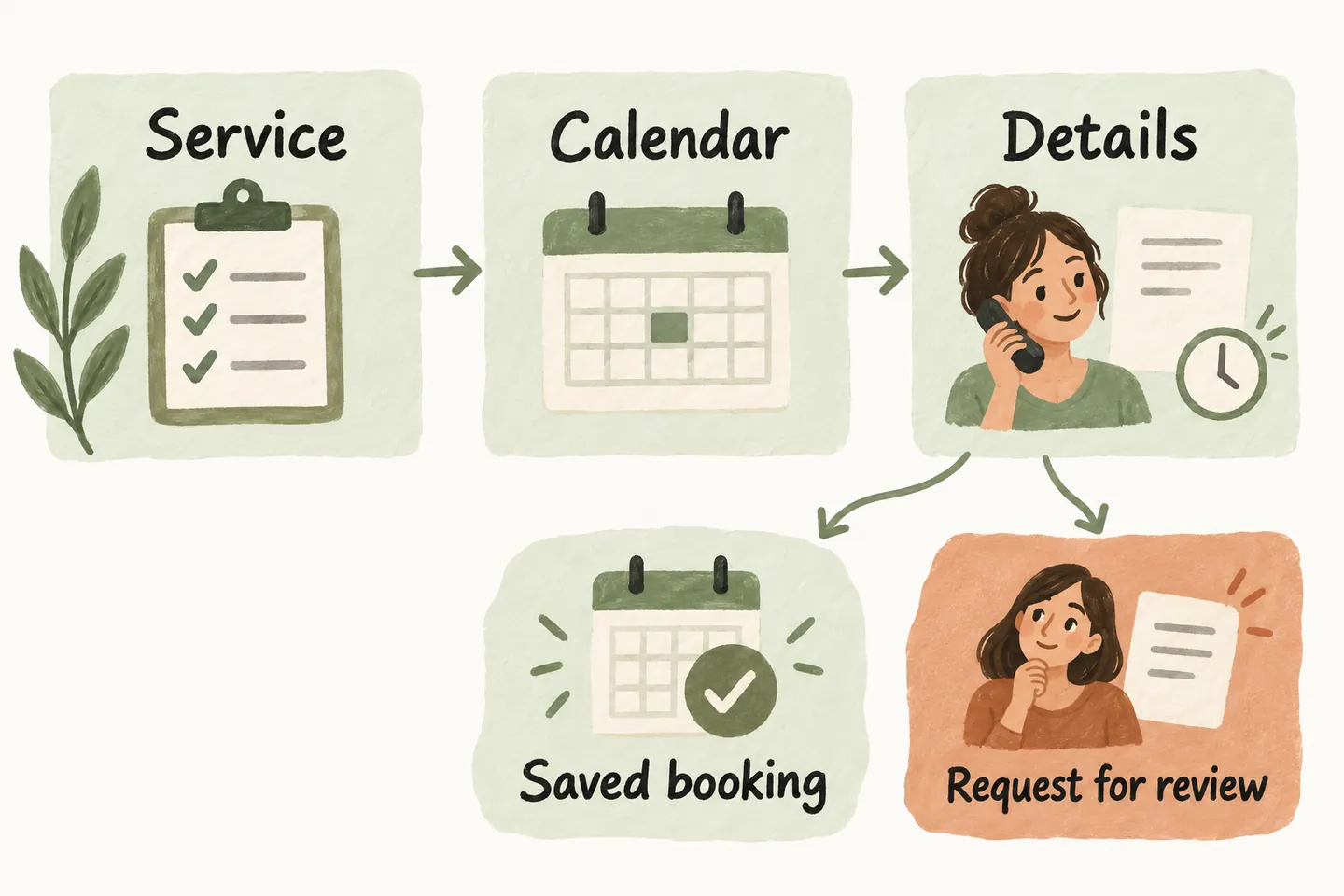
Follow a request-to-confirmation decision tree
- Is the request an approved, directly bookable appointment? If no or uncertain, record a service request and the question staff must resolve.
- Is the supported workflow enabled, connected and able to offer a suitable time under the verified rules? If not, capture the caller’s preference without promising availability.
- Has the caller agreed the service, date, time, timezone and location? Clarify anything missing or contradictory before attempting the save.
- Did the booking save successfully? Confirm only the saved result. A failed or unclear outcome stays unconfirmed and needs review.
- Does the handoff match what the caller heard? Record the confirmed appointment or the unresolved request accurately, including the next responsible person.
Place these gates within your AI receptionist call flow. If a save result is unclear, have staff check the calendar before creating another event; do not solve uncertainty by promising a second booking.
Test both outcomes before expanding the workflow
Run one eligible enquiry, one excluded service, one unavailable time and one booking that cannot complete. Check the conversation and resulting record together. The acceptance question is whether the caller and your team agree on what happened, not whether the conversation sounded confident.
You can try the live AI receptionist demo to hear a fictional enquiry. The website uses sample actions and does not create real customer appointments. Request a personal demo to review your approved service, connection and timing requirements before production activation.
Sources and further reading
YOUR CALLS, YOUR NEXT STEP
Try a fictional appointment enquiry.

Hear the sample receptionist, then request a personal demo to review your supported calendar connection, appointment rules and fallback. Production booking requires an approved, enabled workflow.