How to design an AI receptionist call flow for a small business
A useful AI receptionist call flow gives each caller a clear next step while keeping business commitments under your control. Start with approved answers, booking rules, transfer instructions and a fallback for anything that cannot be completed. This guide provides a simple map, an illustrative service enquiry and a checklist for testing the workflow before production activation.
Updated
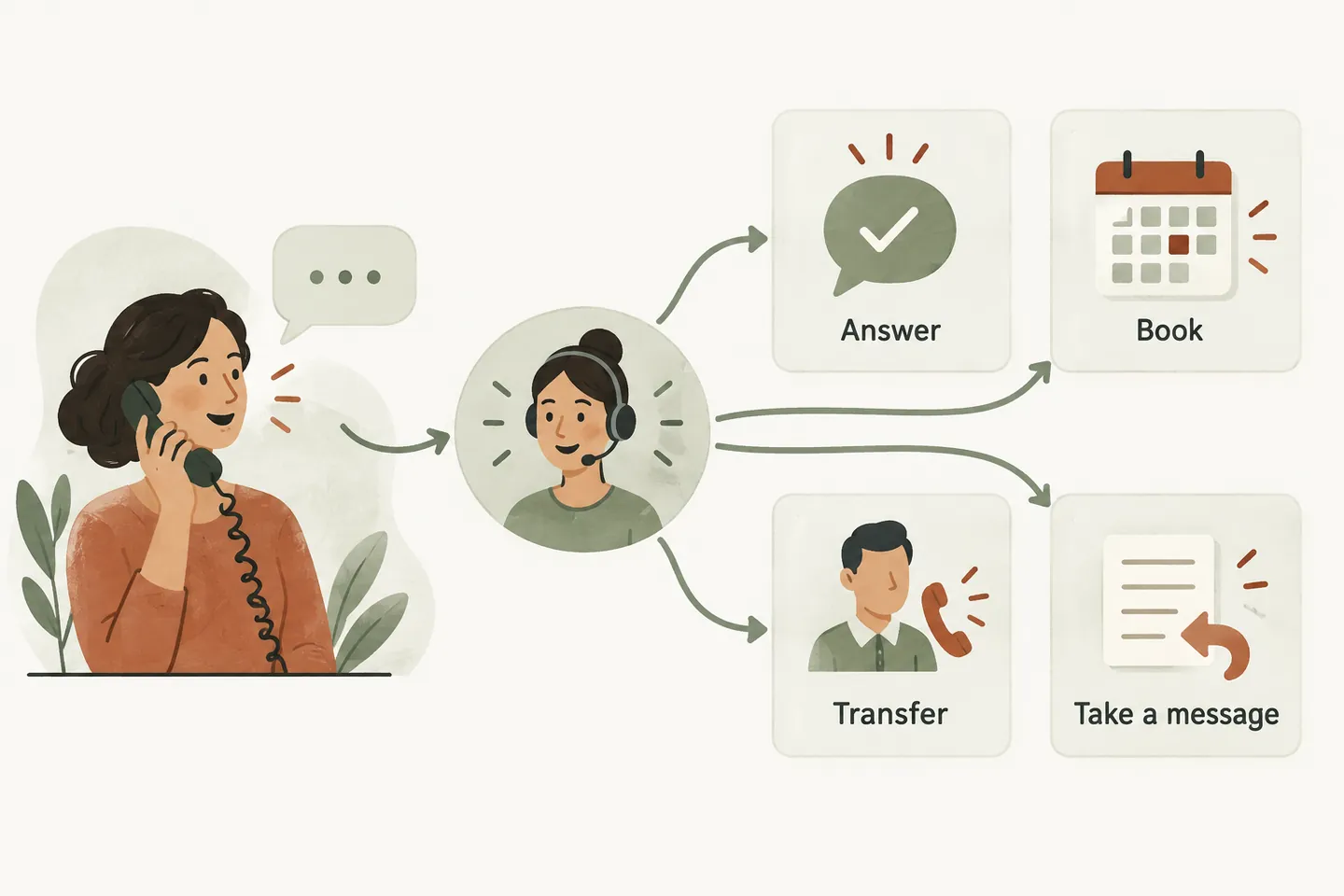
Start with four clear outcomes
A call flow is the set of decisions that turns a conversation into an agreed next step. Before choosing a voice or writing a greeting, list what callers actually need: an answer, an appointment, a conversation with someone, or a callback. Review a small sample of your own recent enquiries without copying private caller details into a planning document. Group the requests by outcome rather than creating a different branch for every phrase someone might use.
For a small service business, a useful starting point is four paths: answer an approved question, save an eligible booking, attempt an approved transfer, or capture a service request. Our AI receptionist overview explains the broader offer. The design task here is deciding where each path should end and who owns the next action.
Use this one-page flow map
The following map is an illustrative planning tool, not a promise that every business can enable every action. Write your actual rules beside each branch. A caller might change their mind midway through the conversation, so the receptionist also needs a clear way to move from an enquiry to a request for a person.
| Caller need | Permitted next step | Fallback |
|---|---|---|
| Business question | Answer from approved business information | Capture the question for staff |
| Appointment | Check the enabled booking workflow and confirm a saved result | Capture a preferred time as a request |
| Speak to someone | Attempt the configured transfer | Take details for the assigned callback owner |
| Service enquiry | Collect the agreed intake fields | Explain that staff must review the request |
Keep the map short enough that the owner can review it in one sitting. If a branch requires information the receptionist cannot access, simplify the outcome instead of filling that gap with an assumption.
Define what the receptionist can answer
Create a concise source of truth for hours, services, service area, pricing statements you permit, and questions that need staff review. Avoid contradictory versions of the same policy. For example, if a visit price depends on the job, the approved answer should explain the review process rather than quote a number that may be wrong.
Also write a useful response for uncertainty: “I can take the details and ask the team to confirm that.” The wording should match your business and the actual callback process. An unfamiliar question is not a reason to invent an answer. The AI voice agent guide provides more context on approved answers and handoffs.
Separate booking from a preferred time
Decide which appointment types are suitable for direct booking. Production booking depends on an enabled workflow and a connected supported Google Calendar. A preferred date mentioned by the caller is not a confirmed appointment. The receptionist should only describe a booking as confirmed when the configured action has actually saved it successfully.
Write down the appointment duration, availability rules and timezone that the setup must use. Then define the failure path. If an action cannot complete, capture the caller's contact details and preferred time for staff review, using language that makes the pending status clear. A sample booking shown in a website demonstration does not establish that your production calendar is connected.
Give every handoff a human owner
A transfer needs a configured destination and someone available to answer. Decide when a transfer is appropriate, what the receptionist should say before trying it, and what happens if the attempt is unanswered. Call answering outside business hours does not mean your staff or technicians are available outside those hours.
Assign a person or team to review messages and service requests. Set callback expectations that your team can actually meet; do not promise an arrival time simply because a caller sounds urgent. The receptionist should follow approved instructions, not diagnose a problem or make emergency-dispatch decisions. Keep the information captured relevant to the next step and avoid requesting unnecessary sensitive details.
Write an example before configuring it
Imagine a fictional plumbing business receiving a request while its owner is on a job. The caller asks whether a leaking tap can be inspected tomorrow. A basic intake might collect the caller's name, callback number, service address and a short description. The flow checks the business's approved service-area rules without promising that a technician is already available.
If the enabled booking workflow can save an appropriate appointment, the receptionist confirms the saved details. Otherwise, it records tomorrow as a preference and explains that the business must confirm. This example demonstrates the difference between gathering a useful request and committing the business to work. Replace the scenario with a real type of enquiry your team handles.
For a practical industry example, see how cleaning businesses collect a useful quote request before the owner confirms the next step.
For a practical industry example, see how painting contractors prepare an estimate visit before the owner confirms the next step.
Test success and failure for every branch
Use a small acceptance checklist before forwarding production calls. Ask a familiar question and an unfamiliar one. Request an eligible appointment and an unsupported one. Try a transfer while someone can answer, then test the agreed fallback. Check that the resulting summaries contain enough information for staff to act without implying that an uncompleted action succeeded.
Include one caller who changes the requested date and one who asks a follow-up question after the main request. Record the expected outcome before making each test call. If the result differs, revise the instructions and retest that branch. You can request a personal demo using your own example to make this review concrete.
Launch with a manageable scope
Start with the smallest useful set of approved outcomes. Confirm forwarding and carrier compatibility during setup, agree who reviews requests, and check the workflow after meaningful changes to hours, services or staff availability. Review the current monthly plans against your expected call minutes rather than assuming every call has the same length.
A free demonstration lets you explore the experience; production service requires an approved setup and paid activation. The best first call flow is one your team can explain, test and maintain. When each branch has an honest outcome and a named follow-up owner, callers receive clearer expectations and staff receive more useful information.
Sources and further reading
YOUR CALLS, YOUR NEXT STEP
Try your call flow with the receptionist.

Use a fictional business enquiry to explore the live demo, then request a personal demonstration to check your booking and handoff requirements.