Check the service area before offering an appointment
An open appointment does not mean the business can visit every address. Check the requested service and complete location against owner-approved coverage rules before offering a time. A clear match may proceed to the remaining booking checks; a boundary or uncertain address needs review. This worksheet separates location eligibility from calendar availability without inventing travel fees, exceptions or a promised visit.
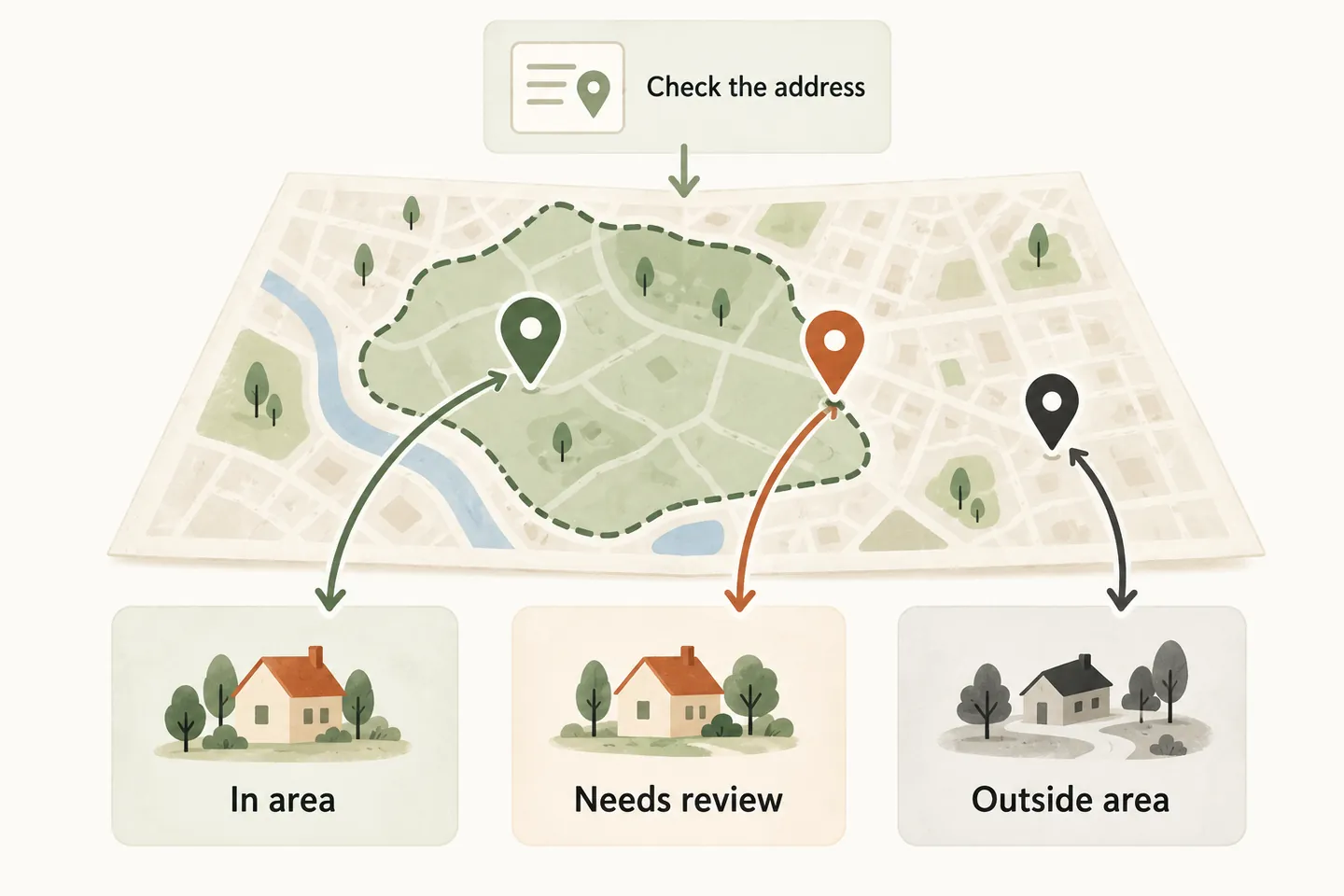
Start with the actual coverage rule
An AI receptionist for small business needs a usable answer to “Do you cover my address?” Give it the approved service-area information, including exclusions and the visit types covered. A town name, broad marketing map or caller’s estimate of driving distance should not override a more specific business rule.
If the business uses ZIP or postal codes, supply its actual approved list and explain any partial-code or street-level exceptions. If coverage depends on job type, record that condition. Keep unknown locations unresolved rather than guessing from a nearby address. Assign an owner and effective date so staff can identify the rule used.
Confirm the service location before discussing times
For an on-site appointment, collect the street number and name, relevant unit, municipality, state or province, country, and ZIP or postal code. Read back the location and clarify missing or conflicting details. Do not substitute a billing address, caller location or telephone area code for the place where service is requested.
Ask for enough detail to identify the service location, not door codes or unrelated personal information. If an address cannot be resolved, collect a request for staff review. A spoken readback confirms what the caller said; it does not prove that the address exists or that the business serves it.
Coverage is one gate in AI appointment scheduling. After location and service fit are established, check the supported calendar, timing and successful save separately.
Complete this service-area eligibility worksheet
Use one row set per approved visit type. The worksheet is a business planning aid, not a claim that the receptionist includes automated mapping, geocoding or radius enforcement. Ask the setup team to demonstrate the supported handling before enabling direct booking.
| Field | What to record | Unresolved outcome |
|---|---|---|
| Visit type | [Approved service and exclusions] | Clarify the request; do not treat every job as eligible. |
| Coverage rule | [Approved codes, streets or defined territory] | Keep the address unconfirmed. |
| Boundary exceptions | [Partial codes, excluded streets and review cases] | Route ambiguous matches to the named reviewer. |
| Service location | [Complete address, read back to caller] | Correct missing or conflicting details first. |
| Decision and authority | [Eligible, review or outside; rule version and owner] | Do not create an exception without approval. |
| Charges and next step | [Approved fee wording, review owner and response policy] | Quote no invented charge or callback deadline. |
Keep the coverage decision with the request so the next person can understand it. “Near our area” is not enough; record the relevant rule and the unresolved question. An address change requires a fresh decision.
Work through three hypothetical locations
Example Service Company uses invented training locations in Example Town. For one routine assessment, Cedar Row numbers 1–40 are eligible, 41–48 require review, and Quarry Lane is excluded. All share the placeholder [TEST CODE]. These are fictional business rules, not real geographic coverage or recommended boundaries.
| Training request | Decision | What happens next |
|---|---|---|
| 10 Cedar Row, [TEST CODE] | Eligible under the approved street rule | Proceed to remaining booking checks; no appointment is confirmed yet. |
| 44 Cedar Row, [TEST CODE] | Boundary review | Record the request and ask the approved reviewer; offer no time. |
| 9 Quarry Lane, [TEST CODE] | Outside this visit’s coverage | Explain the exclusion politely; do not invent a paid exception. |
The shared code deliberately tests whether a broad match incorrectly overrides a street-level restriction. If the real business has no such exception, do not manufacture one; test the distinctions its actual rules require.
Explain the outcome without promising an exception
- Eligible: “That address matches our coverage for this assessment. We still need to check whether an appointment is available.”
- Review: “I need our team to confirm coverage for that address. I have not booked a visit. May I take your callback details?”
- Outside: “That address is outside our current area for this assessment, so I cannot offer that visit.”
These are editable examples. Use only a response deadline the business has approved. If someone offers to pay extra, record the question where the business accepts exception requests; do not imply that payment guarantees acceptance. Likewise, do not assume travel is free because no charge appears in the coverage list.
Test the boundary before trusting the workflow
Run the three cases above with fictional details, then change an eligible address to a boundary address during the same conversation. Test a missing code and conflicting street/code information too. Record the expected decision, observed response, any offered time and reviewer. An incorrect time offer is a failed coverage test even if the appointment never saves.
As checked October 20, 2026, our published offer uses approved service-area knowledge. Booking requires an enabled workflow and connected Google Calendar; confirmation follows a successful save. It does not establish automated travel calculations or territory enforcement. Verify your exact rules, and use request-only handling where they cannot be reliably applied. Review appointment durations and buffers separately once location eligibility is settled.
You can try the live AI receptionist demo with a fictional address question. The sample creates no real appointments. Request a personal demo to test your coverage rules and review fallback before approved production activation.
Sources and further reading
YOUR CALLS, YOUR NEXT STEP
Test the address question before the appointment offer

Try a fictional sample call, then request a personal demo to review your actual coverage rules, unresolved-address handling and supported booking workflow.