Confirm names, phone numbers and addresses accurately over the phone
A phone address confirmation script should collect one detail at a time, repeat it in clear groups and invite a specific correction. Separate the street number from the apartment or suite, confirm the callback number rather than assuming caller ID is correct, and mark anything unresolved for staff. Readback checks what the caller meant; it does not verify identity, prove an address exists or guarantee that your business can serve it.
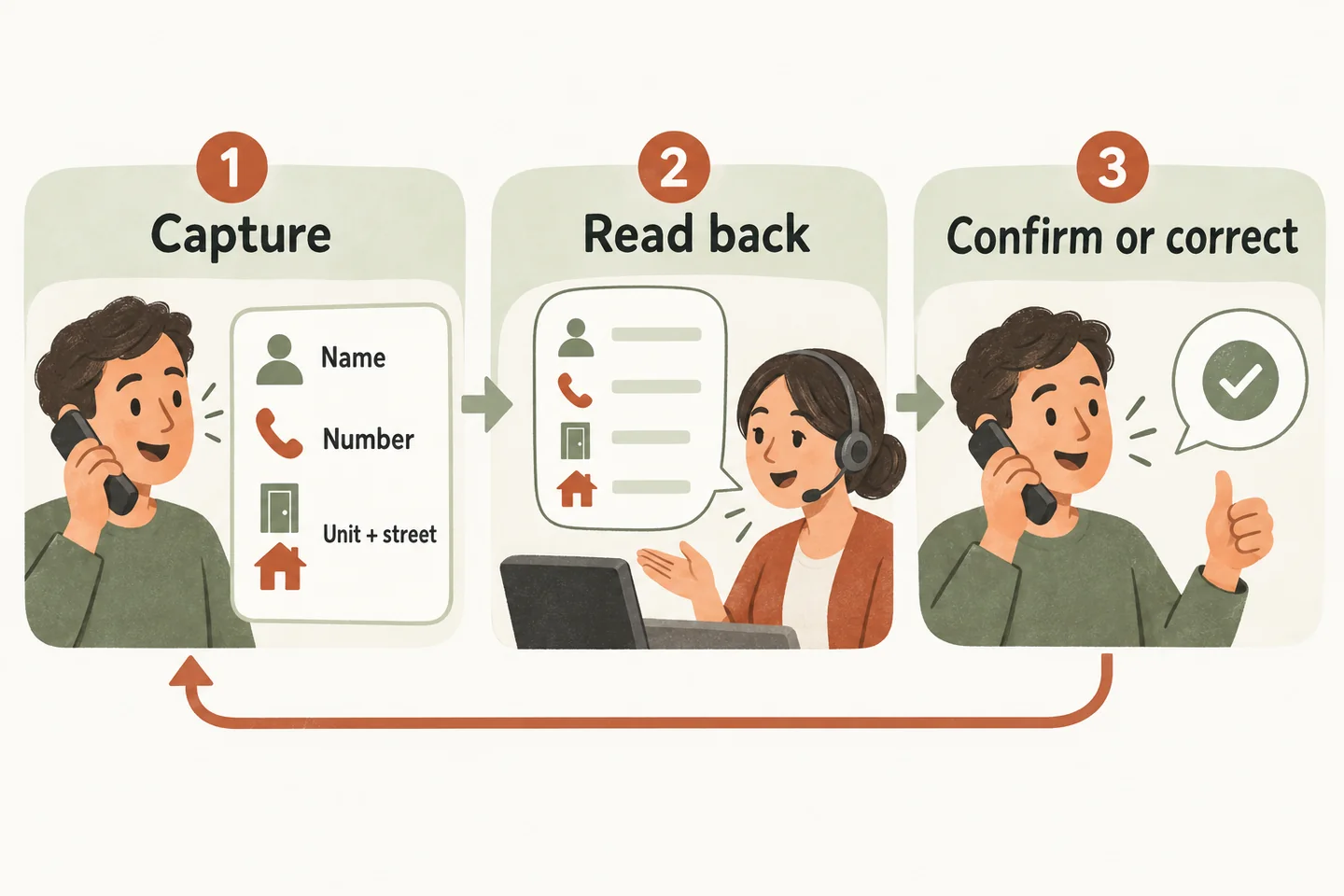
Capture essential details in small steps
Start by explaining the next step: “I’ll take your contact details so the team can review your request.” Ask what name staff should use, then the best callback number. Collect the service address only when the enquiry needs one. A general opening-hours question does not require a full address.
Avoid combining name, number, address and project description into one question. Pause after each field, especially when the caller is spelling a name or moving somewhere quieter. If you interrupt or miss a word, say which part you need again instead of asking them to repeat everything.
The AI receptionist for small business can capture caller details within an approved setup. Treat this script as proposed wording to test, not a promise that every pronunciation or correction will be understood. Place it after your small business phone greeting script so callers first know whom they reached.
Use this fictional readback script
| Step | Suggested wording |
|---|---|
| Name | “What name should the team ask for? I heard Mara Vale. Could you spell the surname?” |
| Callback number | “What is the best number for a callback? I have 202, then 555, then 0142. I’ll read that as two-zero-two; five-five-five; zero-one-four-two. Is each group correct?” |
| Street and unit | “What is the service address? I heard apartment 4B at 218 Example Street West. Is 4B the apartment and 218 the street number?” |
| Correction | “Thank you: apartment 4D, with D as in Delta. The street number remains 218. Is that now correct?” |
| Location | “Which town or city and state or province is that in? [Pause.] Do you have the ZIP or postal code needed for our service-area check?” |
| Close | “I have the request for staff review, with apartment 4D and your confirmed callback number. [Approved person or team] will handle the next step.” |
The closing sentence must match an actual review process. Add a callback window only when your business has approved and can meet it. A successful readback does not mean an appointment, quote or visit has been confirmed.
Read numbers in understandable groups
Use the caller’s complete callback number, including the area code when needed. Repeat a short group, pause, then continue. Say “zero” where a leading zero might disappear, and read repeated digits individually if “double” or “triple” causes confusion. Ask separately whether there is an extension and record it separately.
When a caller changes one group, repeat the corrected group first, then confirm the complete number once. For example: “The last four are zero-one-four-three, not zero-one-four-two. Let me check the full number.” Replace the mistaken value in the working record; do not leave two unlabeled alternatives for the callback owner.
Do not assume the incoming caller-ID number is the number they want used. Someone may be calling from a shared line or asking staff to reach a different contact. Confirm the requested callback destination without implying ownership has been authenticated.
Clarify apartment, street name and direction
Keep a unit, suite or apartment in a separate field from the civic or street number. If you hear “four, two-eighteen,” ask what each number means. Confirm the street type and any direction: “Example Street West,” rather than silently shortening it to “Example.” Ask the caller to spell only the uncertain part.
Canada Post’s civic-address guidance treats an assigned unit number as part of the address. USPS guidance on secondary address units distinguishes apartment, suite, floor and other unit designators. These are postal-address references, not instructions for verifying a service location. They support keeping the caller’s unit information explicit.
Ask whether the service location differs from the billing or mailing address only when that distinction matters to the request. Do not replace the stated location with a familiar nearby address. An unusual spelling, rural description or incomplete postal code needs clarification through the business’s approved process.
Repeat only what is needed to resolve the uncertainty
If only the surname is unclear, revisit the surname. If only the unit letter changed, confirm that change before a concise final recap. Repeatedly reading a long record can introduce another error and make it harder for the caller to identify what needs fixing.
Keep access codes, payment details and unrelated personal information out of a general contact readback. If the caller volunteers information that the workflow should not collect, steer back to the necessary fields. A statement that the details sound correct is not permission for unrelated uses of those details.
Flag unresolved ambiguity for a human callback
When the connection or spelling remains unclear, say so: “I have the callback number confirmed, but I could not confirm the unit letter. I’ll flag that for the team.” Label the uncertain field and assign a reviewer. If no reliable callback number exists, follow the approved alternative contact process rather than promising an unreachable callback.
Test a corrected digit, a unit-number mix-up and an unclear street name. Inspect the resulting record: it should retain the final confirmed values, flag unresolved fields and identify the next owner. Build that fallback into your AI receptionist call flow.
You can try the live AI receptionist demo with fictional, nonsensitive details. The homepage configuration opens first; press Start when ready. The sample does not verify a real address or create a real booking. Request a personal demo to review the script and resulting record for your workflow.
Sources and further reading
YOUR CALLS, YOUR NEXT STEP
Test a correction before relying on the captured details

Try a fictional readback in the live demo, then request a personal demonstration to review your intake fields, confirmation wording and staff fallback.