When should a receptionist transfer a call or take a message?
Choose a call transfer when the caller needs a person, the business permits that handoff and an approved destination is available. Take a message when those conditions are missing, the caller prefers a callback or a permitted transfer cannot complete. The decision about call transfer vs taking a message should follow written owner rules, with a named person responsible for unfinished requests.
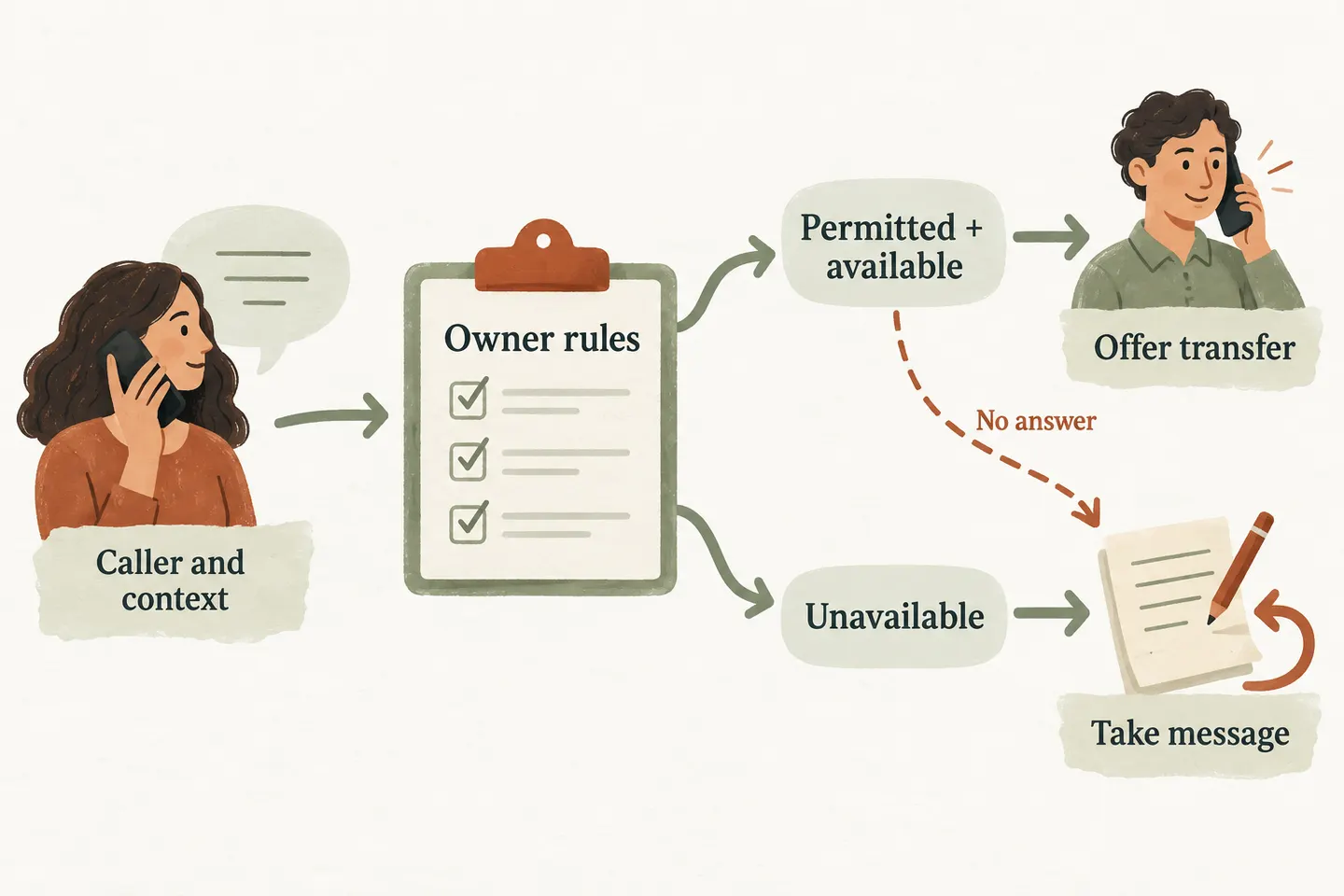
Define which questions need a person now
Start with the caller’s requested outcome. An approved opening-hours question can be answered without interrupting staff. A decision requiring an owner’s permission may need a conversation, but that does not make every request for “the manager” an immediate transfer. Your AI receptionist call flow establishes the wider paths; this worksheet defines the boundary between a human handoff and a recorded request.
Have the owner list permitted reasons, destinations and coverage windows. Separate a caller’s urgency from a commitment the business can make. A complaint, a pricing exception and a request to change today’s visit may have different owners. Do not infer that a technician is available, promise an arrival or treat the receptionist as emergency dispatch.
The current AI receptionist for small business offer supports configured human transfers with an agreed unanswered-call fallback. That scope does not establish every routing method. Confirm the proposed destination, connection behavior and fallback during setup before writing instructions that depend on them.
Collect context before a permitted transfer
Ask for the caller’s name, callback number and a short reason for the call. Repeat the number and summarize the request so the caller can correct either. Add only the details the receiving person needs, such as a routine enquiry category or an existing appointment reference. Avoid passwords, payment-card details and unnecessary sensitive information.
Explain why you are asking: “I can try the approved contact. May I take your name, callback number and a short description first, in case we get disconnected?” Collection is useful only if the supported workflow retains the information and gives the responsible person access. Verify that behavior; do not assume the destination receives a spoken introduction, screen display or automatic alert.
| Caller need | Availability and owner rule | Next step | Unfinished-request owner |
|---|---|---|---|
| Approved factual question | An approved answer covers the question | Answer it; offer the permitted follow-up if uncertainty remains | Assigned office reviewer |
| Decision needing owner approval | Owner permits this category and the approved destination is staffed | Collect context, explain the attempt and try the transfer | Owner or designated reviewer |
| Same-day appointment change | Business permits a handoff and the scheduling contact is available | Attempt the handoff; do not promise the change is accepted | Scheduling contact |
| Routine estimate or callback | No immediate transfer is authorized, or caller prefers a message | Capture the request and explain the review process | Estimate or callback owner |
| Permitted transfer goes unanswered | Configured fallback returns to message capture | State that no connection was completed and record the request | Named fallback reviewer |
Distinguish offering a transfer from completing one
Use different language for different stages. “I can try the owner” describes an available option. “I am trying that number now” describes an attempt. Neither proves that the intended person answered. Ringing, voicemail and a disconnected call need separate outcomes in your review record.
Confirm how the actual setup recognizes a successful handoff and what happens if the call drops or reaches voicemail. Do not assume the receptionist can retrieve a caller after every transfer type. A test must establish the supported outcome before you promise that the caller will return to message capture.
Use message capture when the transfer is unavailable
Destination availability comes from the approved on call phone routing schedule, not from a name appearing in a contact list. If coverage has ended, the number is unverified or the caller declines the attempt, use the agreed message route. Avoid repeated transfers through an unstaffed list.
A useful message separates the request from the promise: caller and callback number; reason and relevant reference; preferred callback window with timezone; attempted destination and observed result; assigned reviewer. Record a preference as a preference. A request for a call at 10:00 does not reserve a staff appointment.
Review handoffs using real outcomes
Test with fictional, nonsensitive enquiries before activation: an approved question, a permitted transfer answered by the intended person, an unanswered attempt and a caller choosing a message. Compare the expected route with the observed outcome and confirm who can see each unfinished request. Correct failed paths before relying on them.
During routine review, distinguish offered, attempted, answered, voicemail, disconnected and message captured. Check whether the assigned person reviewed the request; a saved message alone is not a completed callback. Use the findings to adjust owner rules and test again after destination or coverage changes.
You can try the live AI receptionist demo with a fictional business enquiry. It opens the existing homepage configuration, where you explicitly press Start. The sample does not verify your staff destinations or transfer behavior. Request a personal demo as the next step to review those requirements.
Sources and further reading
YOUR CALLS, YOUR NEXT STEP
Hear the conversation, then verify the handoff

Try a fictional, nonsensitive business enquiry in the live demo. Request a personal demo to confirm your approved transfer destination, unanswered-call fallback and message ownership.