Build an on-call phone routing schedule with clear ownership
An on call phone routing schedule should identify the person responsible for each coverage window, the approved destination and what happens when nobody answers. Put effective dates, a business timezone and a named change owner in the same record. A rota describes your intended coverage; it does not configure a phone system or create staff availability.
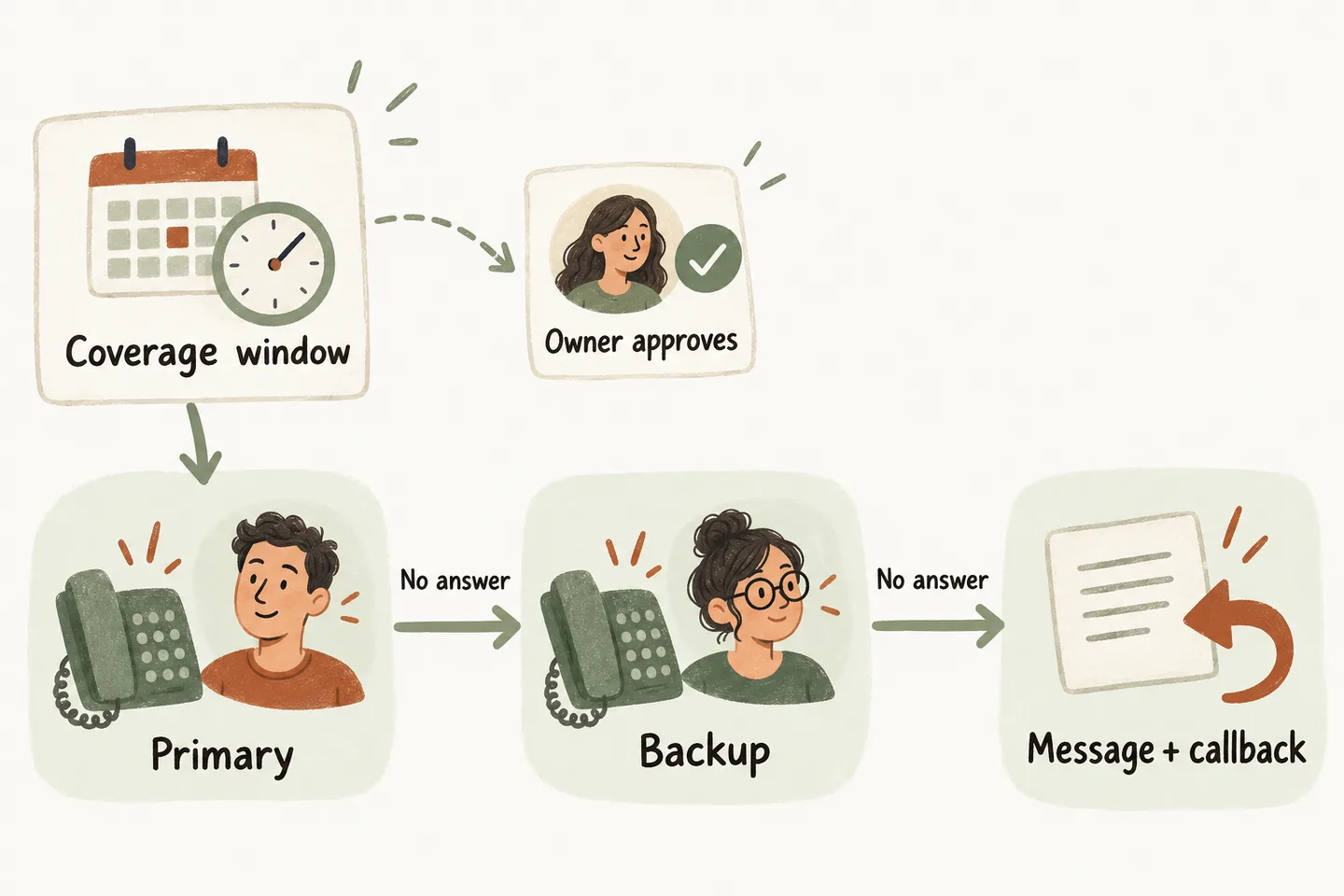
Name the rota owner and the change approver
Start with your after hours answering service coverage plan, then give every active window a named human owner. One person maintains the rota; the primary and backup each acknowledge their availability. A manager approves changes before callers are routed differently.
Keep one current version with an effective start, end and review date. Archive the superseded version without leaving it as an alternative instruction. If an employee swaps shifts, the swap is incomplete until the replacement agrees, the destination is verified and the supported configuration change is confirmed.
Separate “requested” from “active.” A message asking support to change a number is not proof that the change is live. Record who confirmed activation and when. Until then, retain the last verified arrangement if it remains staffed; otherwise use an agreed message-only fallback.
Copy a dated rota template
The following fictional example covers one evening for Example Service Company. Roles stand in for named staff; destination labels stand in for privately stored, verified telephone numbers. Replace them with approved entries before use. These are planning fields, not an import format or a claim that automatic staff rotation is available.
| Field | Early window | Late window |
|---|---|---|
| Effective date | October 23, 2026 | October 23, 2026 |
| Business timezone | America/Toronto; UTC−04:00 for this date | America/Toronto; UTC−04:00 for this date |
| Start inclusive; end exclusive | 17:00 to 19:00 | 19:00 to 21:00 |
| Primary person / destination | Alex / approved number A | Morgan / approved number B |
| Backup person / destination | Morgan / approved number B | Taylor / approved number C |
| Both contacts confirmed | [Names and confirmation times] | [Names and confirmation times] |
| Activation proof | [Approver, version, activation time] | [Approver, version, activation time] |
| Neither available | Capture request; office lead reviews October 26 at 09:00 | Same approved message fallback |
| After coverage ends | Next row takes ownership at 19:00 | Message-only plan starts at 21:00 |
The fictional office reopens October 26; that review target is an internal commitment to check messages, not a guaranteed callback time. At 19:00, only the late row owns new calls. Define what happens to a transfer already underway at the boundary with the setup team.
Use a named timezone and verify the offset for each effective date. The IANA Time Zone Database tracks changes to local offsets and daylight-saving rules. Do not reuse one fixed offset indefinitely or assume every US and Canadian location changes its clocks together.
Confirm the person and the destination separately
Ask each contact to confirm that the approved number reaches the intended device during their window. Check silent mode, call filtering and personal voicemail. A valid number can still be an unusable destination when its owner cannot answer or its voicemail catches every transfer.
During an agreed test, verify the route from the business number through the receptionist to the destination. Check that forwarding on a staff phone does not send the call back to the same receptionist. Record the actual outcome, including unanswered calls and voicemail, rather than treating a ringing phone as a completed handoff.
The current AI receptionist for small business offer includes approved human transfers and an agreed fallback. A second listed contact does not establish automatic sequential dialing. Confirm whether the proposed primary-to-backup route is supported; if not, use the approved message path and let a person coordinate the backup. New routing destinations require setup review.
Assign ownership when neither person answers
Write the fallback beside the rota, not in a separate informal chat. It should say which details may be collected, who reviews the resulting request and when that person checks for it. Confirm the handoff method; do not assume that a missed transfer automatically alerts every employee.
Keep review targets and caller promises separate using your after hours callback policy. The rota establishes who is responsible now; the callback policy establishes how an unfinished request is reviewed. Neither document turns an urgent enquiry into emergency dispatch or guarantees an arrival.
Test the start, the handoff and the end
Use fictional, nonsensitive calls during an agreed test window. Have the outgoing and incoming owners check the results together. Keep a short log with the version, test time, expected destination, observed result and person responsible for a correction.
- Before the start: confirm the previous arrangement still applies and the new contact is ready.
- At the start: confirm new calls reach the approved primary destination and the intended person answers.
- Primary unavailable: verify the agreed backup or message path. Repeat with the backup unavailable if that path is supported.
- At the end: confirm new calls use the next approved row or message-only plan, without an unattended gap.
If a test fails, stop relying on the unverified route. Ask the change owner to restore the last verified, staffed arrangement or the approved message fallback. Record the correction and retest before marking the version active. Recheck the rota after absences, number changes and dated closures.
You can try the live AI receptionist demo with a fictional enquiry to hear the conversation style. It opens the existing configuration; you press Start yourself. The sample does not prove your rota or transfer destinations. Request a personal demo to verify those requirements before activation.
Sources and further reading
YOUR CALLS, YOUR NEXT STEP
Hear a call, then verify your handoff

Try a fictional, nonsensitive enquiry in the live demo. Request a personal demo to check your approved contacts, coverage boundaries and unanswered-call fallback.