Plan landscaping call overflow for seasonal enquiry peaks
Plan landscaping seasonal call overflow around three separate limits: which enquiries you accept, which appointment openings staff approve, and how many callbacks an assigned person can realistically handle. An answered call does not create crew capacity. Use the worksheet below to connect each request category to an honest next step, then review the queue before repeating a callback promise during a busy period.
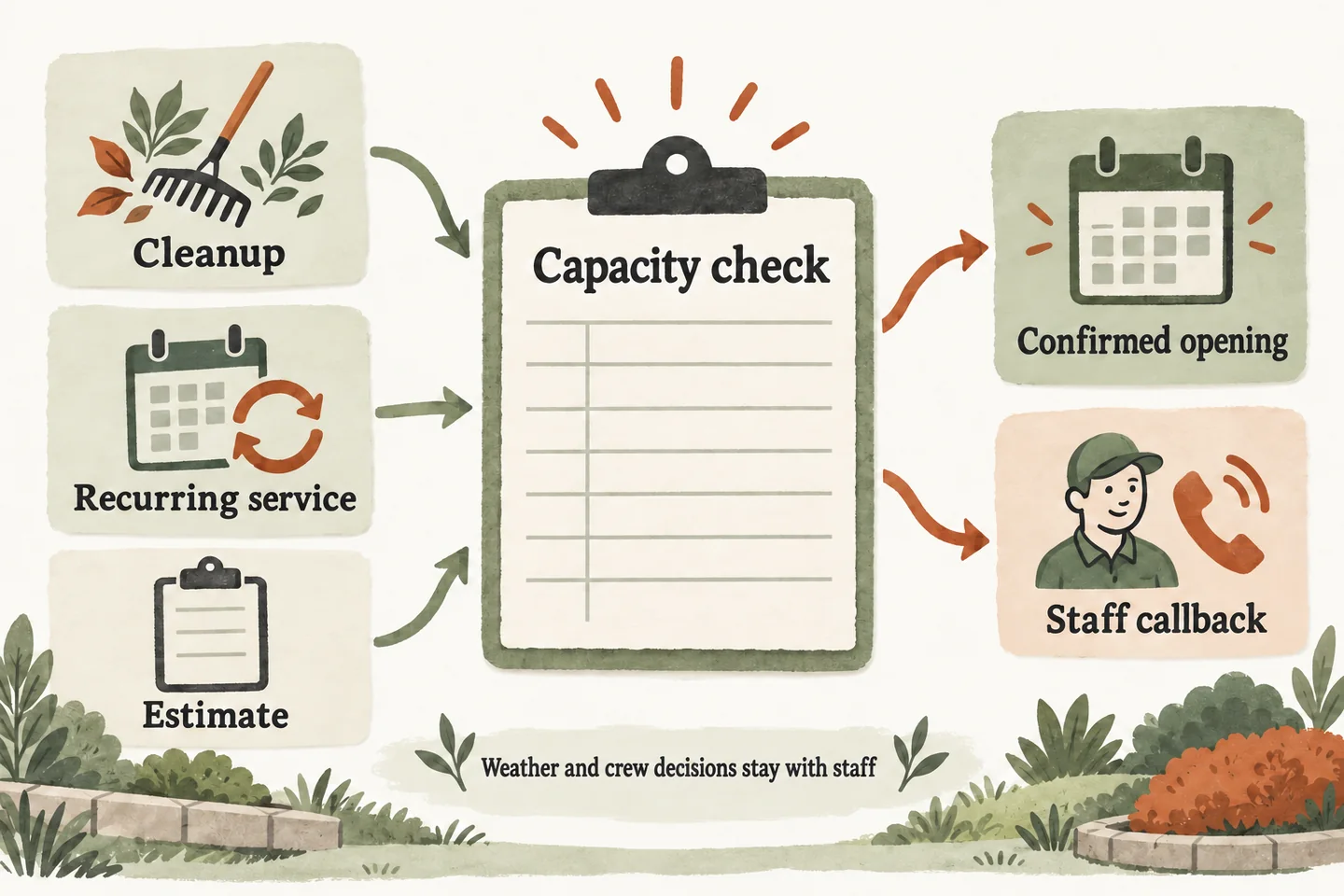
Review business-owned call patterns
Choose a review window from your own call records: a recent busy week, a comparable period, or the next few operating days. Count distinct requests by category and time of day. Separate new enquiries from existing-customer questions, repeat calls and unrelated contacts; otherwise one unresolved request can appear to be several new opportunities.
Write down when calls went unanswered and when staff actually returned them. Record what callers wanted, rather than assuming every missed call was a sale. If historical records are incomplete, mark the gaps and start a simple log. Your business’s evidence should determine overflow coverage; a general seasonal label does not establish demand or staffing needs.
Use the landscaping answering service guide for property and work-scope intake. This worksheet adds the capacity decisions that become important when requests accumulate.
Separate cleanup, recurring service and estimates
Complete one worksheet for a named review period. The owner approves accepted work and calendar rules; the callback owner confirms the follow-up allowance. Leave a field unresolved when nobody has verified it. An empty calendar does not establish that an estimator, crew or service route is available.
| Enquiry category | Eligible requests | Approved calendar openings | Callback allowance and owner | Next step when full |
|---|---|---|---|---|
| One-time cleanup | [Count and accepted scope] | [Estimate visit slots, or request only] | [Number to review; named estimator] | Capture scope and preferred timing for review. |
| Recurring service | [Count and requested frequency] | [Consultation slots, or request only] | [Number to review; maintenance owner] | Check route fit before offering a start date. |
| New project estimate | [Count and accepted project types] | [Approved estimate slots only] | [Number to review; project estimator] | Preserve the goal and arrange a reviewed next step. |
Keep existing-service questions in a separate queue with a staff owner. A customer asking about today’s visit should not consume a new-estimate opening. If one caller wants recurring care and a cleanup, keep both needs attached to one request so two reviewers do not unknowingly promise conflicting next steps.
Review the AI voice agent guide before treating calendar openings as bookable. The current offer supports booking when enabled and connected to Google Calendar, with confirmation only after a successful save. That establishes an appointment outcome, not approval of the landscaping work.
Set realistic callback commitments
Choose callback wording from the actual owner’s availability. Specify who reviews the queue, the latest review time and a backup when that person is unavailable. Do not shorten a callback window merely because the caller sounds eager. If nobody has approved a deadline, capture a timing preference and explain that staff must confirm the next step.
The estimator must decide whether those five reviews fit the promised window. If not, revise the approved callback wording before accepting more requests under the old promise. A usable record includes the request, owner, agreed next step and review deadline. When you design an AI receptionist call flow, give that full-queue condition its own approved response.
Leave weather changes and crew allocation with staff
A calendar opening must not turn into a weather guarantee, assigned crew or promised completion date. Route changes, site conditions, equipment needs and work sequencing remain staff decisions. For an existing customer asking to move a visit, preserve the request without saying the route or work order has changed.
Suggested wording to adapt: “I can record your preferred timing and what you need changed. The team must review the schedule before confirming a new arrangement.” Use only wording your business approves. This planning method does not establish weather-based automation, landscaping-software integration, instant project quotes or pesticide advice.
Review accepted requests without invented revenue losses
At each agreed review, reconcile the intake list with what staff actually handled. Mark duplicates, outside-scope requests, appointments saved, reviews pending and callbacks completed. Keep the appointment record separate from a quote accepted or work scheduled. A captured enquiry is useful context, but it is not proof of a qualified lead or revenue.
Look for concrete problems: missing contact details, an owner who never received the request, an expired callback commitment or an appointment offered under an outdated rule. Correct the relevant instruction and retest it. Compare like periods using your own records; do not multiply every unanswered call by an invented average job value.
Test a full calendar and an unavailable reviewer
The AI receptionist for small business offer uses approved business information and request capture. Verify your specific setup before relying on it. You can try the live AI receptionist demo with a fictional cleanup enquiry. The link opens the existing configuration; you explicitly press Start before audio begins.
Then request a personal demo to review a full calendar, an unavailable callback owner and a requested weather-related change. The website sample does not verify your production connections or crew schedule. Check that each unconfirmed action stays a request, with a clear person responsible for review.
Sources and further reading
YOUR CALLS, YOUR NEXT STEP
Try a seasonal landscaping enquiry

Use fictional, nonsensitive details in the live demo, then request a personal demo to review your intake limits, approved calendar rules and callback responsibilities.